Claude Code Vim Mode: Keybindings, Remapping, and Fixes
 By Neo Zino - builder of ClockedCode11 min read
Every Claude Code vim mode keybinding grouped by category, how to remap the INSERT-mode escape with the jj trick, and fixes for the ways it silently misbehaves.
Made with DispatchSEO
On this page
Vim mode in Claude Code turns the prompt into a real modal editor: NORMAL, INSERT, and VISUAL modes, with around 60 vim-style keybindings for movement, editing, and text objects. Turn it on from /config, under Editor mode, or by setting editorMode to "vim" in ~/.claude/settings.json. The full keybinding table, how to remap the one thing every vim user wants changed, and the ways it can quietly misbehave are below.
TL;DR: Turn on vim mode from
/config-> Editor mode, or"editorMode": "vim"in settings - it supports NORMAL, INSERT, and VISUAL modes with roughly 60 keybindings for navigation, editing, and text objects. Map an INSERT-mode escape likejjwithvimInsertModeRemaps, but only from your user settings; the identical key in a project's.claude/settings.jsonis silently ignored, andclaude doctorwon't catch it either. Checked against Claude Code 2.1.273, the CLI installed for this guide, on 2026-09-16. Prefer one long page over a printed reference? The cheat sheet tool is searchable and covers slash commands and CLI flags too, not just vim.
Turning on vim mode and what actually changes
Switch Editor mode to vim in /config, or set "editorMode": "vim" in ~/.claude/settings.json directly - unlike the remap setting covered further down, this one also works from a project's settings file, so a team can ship it as a repo default. Once it's on, the prompt stops reading keystrokes the normal way: you land in NORMAL mode, and everything from cursor movement to deletes goes through vim's command grammar instead of typing straight through.
Two things catch people off guard here. First, ~/.claude/keybindings.json still exists and still works, but it only rebinds Claude Code's own actions (submit, toggle a panel, open the transcript viewer) - vim motions like hjkl live somewhere else entirely and don't show up in that file no matter how you write the binding block. Second, pressing Escape behaves differently depending on mode: outside vim mode it fires the chat:cancel shortcut, but inside vim mode it's reserved for the INSERT-to-NORMAL switch and won't cancel anything.
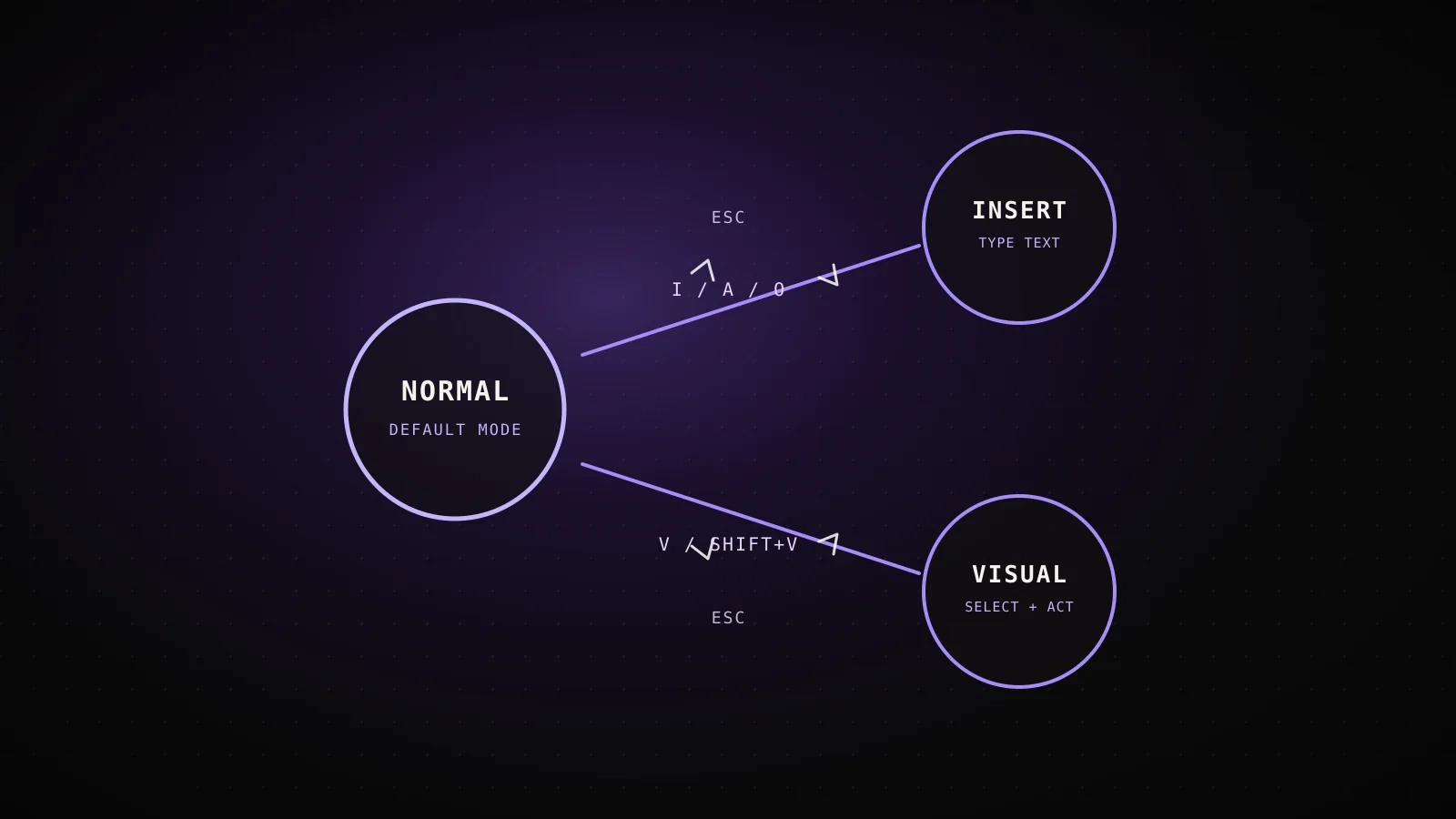
The three modes and how you get to each one
editorMode: vimNORMAL
Default mode - navigate and edit, nothing you type is inserted
Enter with
Esc or Ctrl+[ from INSERT or VISUAL
The starting mode every time you open the prompt
INSERT
Type text like a normal, non-vim prompt
Enter with
i, I, a, A, o, or O from NORMAL
Enter still submits here - unlike real vim, it never inserts a newline
VISUAL
Select a span, then act on it with an operator
Enter with
v (character-wise) or V (line-wise) from NORMAL
Block-wise selection with Ctrl+V isn't supported
Claude Code keeps whichever mode and cursor position you left the prompt in, even after toggling the transcript viewer or closing a panel like /config.
The full keybinding reference: navigation, editing, and text objects
Every vim keybinding, by category
52 bindingsNavigation
15- f{char}/F{char} jump to a character, ; repeats the jump
- gg and G jump to the beginning or end of input
Editing
19- dw/de/db delete by word, to end, or back
- s and S substitute a character or a line, since v2.1.211
Text objects
7- iw/aw and i(/a( work as arguments to d, c, and y
- i"/a" and i[/a[ cover quotes and brackets the same way
Visual mode
11- r{char} replaces every selected character at once
- o swaps the cursor and anchor without losing the selection
Counted from code.claude.com's interactive-mode reference, checked against the CLI installed for this guide (`claude --version` reports 2.1.273).
Navigation (NORMAL mode)
| Command | Action |
|---|---|
h / j / k / l | Move left / down / up / right |
Space | Move right |
w | Next word |
e | End of word |
b | Previous word |
0 | Beginning of line |
$ | End of line |
^ | First non-blank character |
gg | Beginning of input |
G | End of input |
f{char} / F{char} | Jump to next / previous occurrence of a character |
t{char} / T{char} | Jump to just before / just after the next occurrence of a character |
; / , | Repeat, or reverse-repeat, the last f/F/t/T motion |
If the cursor is at the beginning or end of input and can't move further,
j/kand the arrow keys navigate command history instead of moving the cursor. On an empty prompt, the left arrow opens agent view from NORMAL mode too, not just INSERT - before Claude Code v2.1.219 it did nothing there.
Editing (NORMAL mode)
| Command | Action |
|---|---|
x | Delete character |
dd | Delete line |
D | Delete to end of line |
dw / de / db | Delete word / to end of word / back a word |
df{char} / dt{char} | Delete to and including, or up to, the next occurrence of a character |
cc | Change line |
C | Change to end of line |
cw / ce / cb | Change word / to end / back |
s | Substitute character - delete under cursor, enter INSERT (v2.1.211+) |
S | Substitute line - clear the line, enter INSERT (v2.1.211+) |
yy / Y | Yank (copy) line |
yw / ye / yb | Yank word / to end / back |
p / P | Paste after / before cursor |
>> / << | Indent / dedent line |
J | Join lines |
u | Undo |
. | Repeat last change |
Text objects (arguments to d, c, and y)
| Command | Action |
|---|---|
iw / aw | Inner / around word |
iW / aW | Inner / around WORD (whitespace-delimited) |
i" / a" | Inner / around double quotes |
i' / a' | Inner / around single quotes |
i( / a( | Inner / around parentheses |
i[ / a[ | Inner / around brackets |
i{ / a{ | Inner / around braces |
Remapping INSERT-mode escape (the jj trick)
Every vim user hits the same wall within the first five minutes: they're stuck in INSERT mode and their hand doesn't want to leave the keyboard's home row for Escape. vimInsertModeRemaps, shipped in v2.1.208, fixes that by mapping a two-key sequence typed in INSERT mode to Escape:
{
  "editorMode": "vim",
  "vimInsertModeRemaps": { "jj": "<Esc>" }
}
Each entry must be exactly two printable characters mapping to the literal string "<Esc>" - anything else is silently ignored. Type the first character and it inserts normally; press the second within one second and Claude Code removes both characters and switches to NORMAL mode. Wait past that window, or type a different key in between, and both characters stay as literal text, so a real word that happens to start with a doubled letter still types out fine if you don't rush it.
The setting has a scope rule that catches almost everyone who copies this snippet into the wrong file: Claude Code reads vimInsertModeRemaps only from your user settings file, a file passed with --settings, or managed settings. A project's .claude/settings.json or .claude/settings.local.json is ignored outright - specifically so a repository you check out can't remap your own keystrokes.
vimInsertModeRemaps actually takes effect
- ~/.claude/settings.json (your user settings)
- A file passed with --settings
- Managed settings deployed by an organization
the same key sits there doing nothing
- .claude/settings.json (project)
- .claude/settings.local.json (project)
- No error, no warning - not even from claude doctor
Tested for this guide: a project .claude/settings.json carrying vimInsertModeRemaps, then `claude doctor` on v2.1.273, still reported "No installation issues found."
That silent ignore is easy to verify yourself, and it's why the setting is worth double-checking before you assume vim mode is broken:
mkdir /tmp/vim-remap-test && cd /tmp/vim-remap-test
git init -q
mkdir .claude
echo '{ "editorMode": "vim", "vimInsertModeRemaps": { "jj": "<Esc>" } }' > .claude/settings.json
claude doctor
Run that from a fresh directory and claude doctor still prints "No installation issues found" - the same checkup that catches malformed hooks and missing MCP environment variables has nothing to say about a remap sitting in the wrong file. If jj isn't returning you to NORMAL mode, move the setting to ~/.claude/settings.json before you look anywhere else.
Visual mode and what it can't do
Press v for character-wise selection or V for line-wise selection, then use motions to extend the selection and operators to act on it directly:
| Command | Action |
|---|---|
d / x | Delete selection |
y | Yank selection |
c / s | Change selection |
p | Replace selection with register contents |
r{char} | Replace every selected character with {char} |
~ / u / U | Toggle, lowercase, or uppercase selection |
> / < | Indent or dedent selected lines |
J | Join selected lines |
o | Swap cursor and anchor |
iw / aw / i" / … | Select a text object |
v / V | Toggle between character-wise and line-wise, or exit |
Block-wise visual mode - the Ctrl+V rectangle selection real vim uses for column edits - isn't supported. If your muscle memory reaches for it to align a column of text or comment out a block, it won't fire; character-wise or line-wise selection plus a text object is the closest substitute Claude Code's prompt input has.
When vim mode misbehaves: real causes, real fixes
Ctrl+[ doesn't return you to NORMAL mode. It's supposed to work as an Escape alternative, but terminals using the Kitty keyboard protocol need Claude Code v2.1.242 or later to send it correctly. Older versions, or a terminal that doesn't implement that protocol, drop the keystroke - plain Esc always works as a fallback regardless of version or terminal.
A pasted block disappears when you delete near it. Paste more than 800 characters or more than three lines and Claude Code collapses it to a placeholder like [Pasted text #1 +120 lines]. Delete through that placeholder with a vim motion - df] landing inside it, for example - and Claude Code removes the whole placeholder at once, not just the characters your motion targeted. Press p in NORMAL mode immediately after to paste it back; the equivalent outside vim mode is Ctrl+Y after a Ctrl+W or Ctrl+K deletion.
Enter submits instead of adding a line. This isn't a bug - Enter always submits your prompt in INSERT mode, unlike standard vim where it inserts a newline. Use o or O from NORMAL mode to open a new line, or Ctrl+J from either mode, when you need a multi-line prompt.
A remap you set isn't doing anything. See the scope rule two sections up - vimInsertModeRemaps only reads from user or managed settings, and a project settings file swallows it without a warning anywhere, including in claude doctor.
When vim mode gets in your way
- You're not using it. None of this applies until Editor mode is actually set to
vimin/config- nothing in a default session changes. - You want real multi-line editing on Enter. It always submits in INSERT mode here;
o/O/Ctrl+Jcover the newline case, but there's no setting to swap that behavior the way some terminal apps let you remap Enter and Shift+Enter. - You lean on block-wise selection. Column edits via
Ctrl+Varen't available - plan on character-wise or line-wise selection plus a text object instead. - You want an unusual NORMAL-mode layout. Vim motions and commands can't be remapped through
keybindings.json; the only customizable piece is the INSERT-mode escape sequence covered above, and it takes exactly one two-character mapping to<Esc>, nothing more elaborate. - You want a team-wide remap shipped in the repo.
vimInsertModeRemapsis deliberately user-scoped - a checked-out project can't override your own keystrokes, so there's no way to commit this particular setting for a team the wayeditorModeitself can be.
FAQ
How do I turn on vim mode in Claude Code?
Switch Editor mode to vim in /config, or set "editorMode": "vim" in ~/.claude/settings.json directly. Unlike the remap setting below, editorMode also works from a project's settings file.
How do I get out of INSERT mode without reaching for Escape?
Add "vimInsertModeRemaps": { "jj": "<Esc>" } to your user settings file. Typing j twice within one second removes both characters and switches to NORMAL mode; wait longer or type something else and both letters stay as text.
Why doesn't my vimInsertModeRemaps setting do anything?
It's almost always a scope problem. Claude Code only reads vimInsertModeRemaps from your user settings file, a file passed with --settings, or managed settings - a project's .claude/settings.json or .claude/settings.local.json is ignored with no error, and claude doctor won't flag it either. Move the setting to ~/.claude/settings.json.
Can I remap vim's own keys, like h/j/k/l?
No. Vim motions and commands aren't actions in keybindings.json - that file only rebinds Claude Code's own component-level shortcuts. The one exception is vimInsertModeRemaps, which maps a two-key INSERT-mode sequence to Escape and nothing else.
Does Enter insert a newline in vim mode like it does in real vim?
No. Enter still submits your prompt in INSERT mode, unlike standard vim. Use o or O in NORMAL mode, or Ctrl+J, to insert a newline instead.
Is block-wise visual mode supported?
No. Character-wise (v) and line-wise (V) visual selection both work, but block-wise selection with Ctrl+V is the one common vim feature Claude Code's vim mode doesn't support.
Give it a week and most of this reference turns back into muscle memory - the two things worth keeping bookmarked are the vimInsertModeRemaps scope rule and the paste-placeholder behavior, since both look like bugs the first time they bite and neither one actually is. If you're tuning the rest of settings.json at the same time, ClockedCode's curated Claude Code setup covers the other defaults worth changing beyond vim mode.