CLAUDE.md: The Complete Guide to Claude Code's Memory
 By Neo Zino - builder of ClockedCode15 min read
What a CLAUDE.md file is, where every Claude Code memory file lives, how auto memory works, and how to write rules Claude actually follows - the 2026 guide.
On this page
Every Claude Code session starts with a blank context window. The reason the tool still feels like it knows your project on turn one is a small stack of markdown files, and the most important of them is CLAUDE.md. I build my products in Claude Code every day, and no single file has more influence over how well that goes. This guide covers the whole memory system as it works in 2026: what CLAUDE.md is, where every file lives, the auto memory Claude now writes for itself, and why half the internet's advice about this file is out of date.
TL;DR:
CLAUDE.mdis a markdown file Claude Code loads at the start of every session - project rules in./CLAUDE.md, personal rules in~/.claude/CLAUDE.md, private notes in./CLAUDE.local.md. Keep each file under about 200 lines, write rules specific enough to verify, and split overflow into path-scoped.claude/rules/files instead of letting the main file bloat. Since v2.1.59 Claude Code also keeps auto memory - notes it writes for itself per repository. CLAUDE.md is context, not enforcement: if a rule must hold every time, that is a hook's job.
What is a CLAUDE.md file?
CLAUDE.md is a markdown file that Claude Code reads automatically at the start of every session and keeps in context for the entire conversation - a standing instruction sheet for your project, your personal workflow, or both. You write it in plain English: build commands, conventions, architecture notes, "always do X" and "never touch Y" rules. Claude Code finds it by name and location; there is nothing to register or configure.
Mechanically, Claude Code delivers the file's content as a user message right after the system prompt, per the official memory docs. Sit with that detail for a second, because it tells you what the file actually is: it carries serious weight on every turn, but it is context, not enforcement. Claude reads it and tries to follow it. There is no runtime guarantee, which is why the writing style matters (covered below) and why hard guardrails belong in hooks instead.
If you want to see a real one rather than a spec, I published my own tuned CLAUDE.md, annotated line by line - read this guide for how the system works, then that post for what a tuned file looks like after months of pruning.
How Claude Code memory works: the two systems
Claude Code has two memory systems, and this is the part most older guides miss: CLAUDE.md files, which you write, and auto memory, which Claude writes itself. Both load at the start of every conversation, and they answer different questions.
| CLAUDE.md | Auto memory | |
|---|---|---|
| Who writes it | You | Claude |
| What it holds | Instructions and rules | Learnings and patterns |
| Scope | Project, user, or organization | Per repository, shared across worktrees |
| Loaded | Every session, in full | Every session (first 200 lines or 25KB of the index) |
| Good for | Conventions, workflows, architecture | Build commands and insights Claude discovers on its own |
The mental model I use: CLAUDE.md is what I would tell a new developer on day one. Auto memory is the notebook that developer keeps for themselves during week one. You maintain the first; the second accumulates on its own.
Where every CLAUDE.md file lives
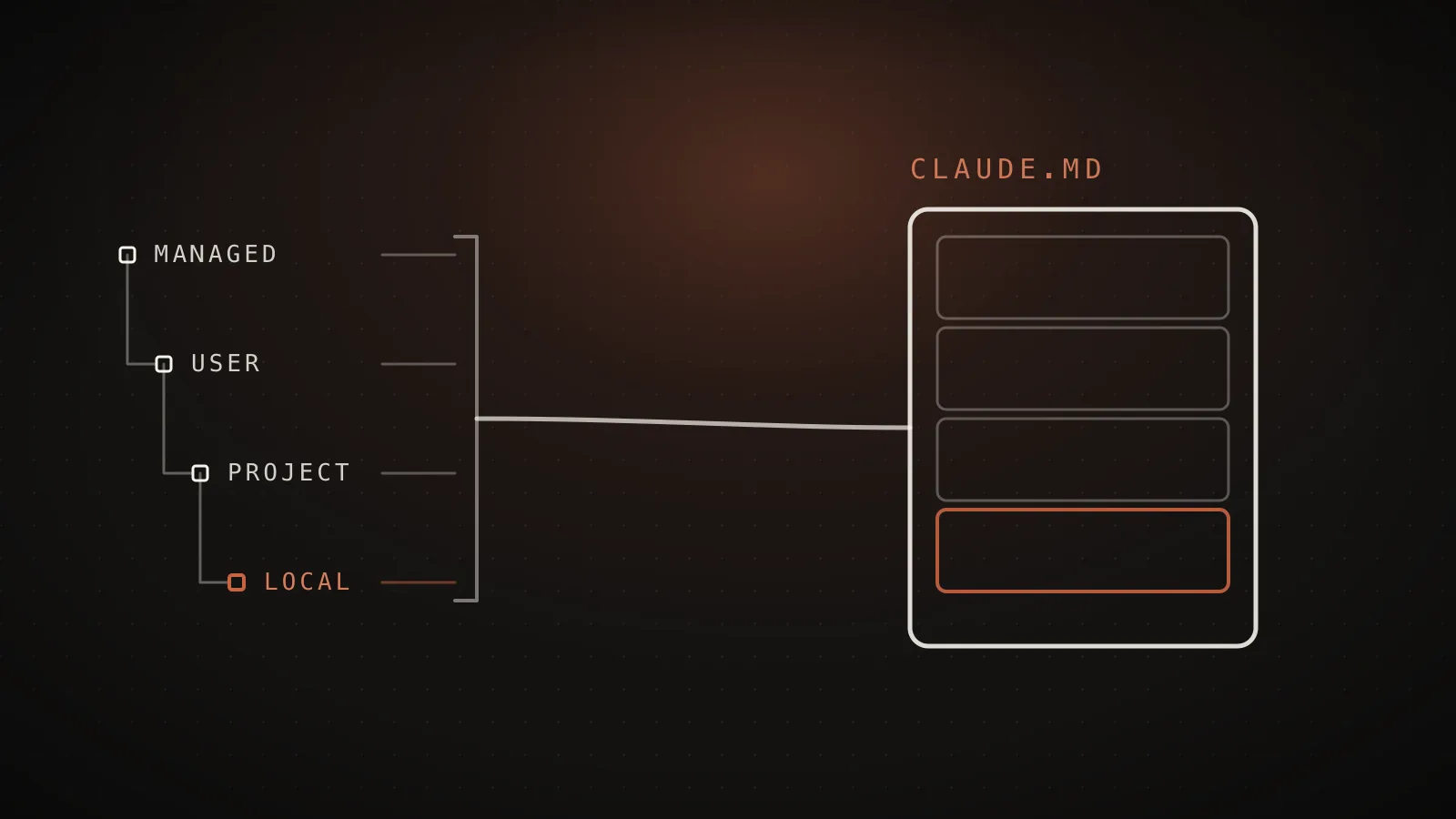
Claude Code does not read one file. It loads a hierarchy, broadest scope first, so the most specific instructions land closest to your conversation:
| Scope | Location | Use it for |
|---|---|---|
| Managed policy | macOS: /Library/Application Support/ClaudeCode/CLAUDE.md - Linux/WSL: /etc/claude-code/CLAUDE.md - Windows: C:\Program Files\ClaudeCode\CLAUDE.md | Org-wide rules deployed by IT; individuals cannot exclude them |
| User (global) | ~/.claude/CLAUDE.md | Your habits across every project |
| Project (shared) | ./CLAUDE.md or ./.claude/CLAUDE.md | Facts about this repo, committed for the team |
| Local (private) | ./CLAUDE.local.md | Private notes for this repo, added to .gitignore |
On top of the fixed locations, Claude Code walks up the directory tree from wherever you launched it and loads every CLAUDE.md and CLAUDE.local.md it finds along the way. Launch in foo/bar/ and you get foo/CLAUDE.md plus foo/bar/CLAUDE.md, concatenated in that order - files closer to your working directory are read last, and within each directory the local file is appended after the shared one. Nothing overrides anything; it all stacks.
Subdirectories work differently, and this trips people up in monorepos: a CLAUDE.md below your working directory does not load at launch. It loads on demand, the first time Claude reads a file in that subtree. So a nested package's rules are not active from message one - they arrive when Claude actually goes there.
Two smaller points worth knowing. CLAUDE.local.md is alive and well - the docs treat it as a first-class scope, so ignore claims that it is deprecated. And since it is gitignored, it only exists in the worktree where you created it; if you run parallel worktrees, import a file from your home directory instead (@~/.claude/my-project-instructions.md) so every worktree shares the same personal notes.
Auto memory: the notes Claude writes for itself
Auto memory landed in Claude Code v2.1.59 and is on by default: Claude saves notes for itself as it works - build commands, debugging insights, architecture notes, your corrections - and reloads them next session without you writing anything. When you see "Writing memory" or "Recalled memory" in the interface, this is what is happening.
The storage is plain markdown, per repository, at ~/.claude/projects/<project>/memory/. The <project> path is derived from the git repo, so every worktree and subdirectory of the same repository shares one memory. Inside there is a MEMORY.md index plus topic files Claude creates as needed (debugging.md, api-conventions.md, and so on). Only MEMORY.md loads at session start, capped at the first 200 lines or 25KB, whichever comes first - topic files are read on demand when Claude needs them. That cap applies to auto memory only; your CLAUDE.md files always load in full.
A few practical notes from running with it daily:
- It is auditable. Run
/memoryand open the auto memory folder - everything is markdown you can read, edit, or delete. I check mine every couple of weeks; it is usually right, and occasionally it has memorized a workaround I have since fixed properly, which is worth deleting before it misleads a future session. - It is machine-local. Nothing syncs across machines or cloud environments. Your CLAUDE.md travels with the repo; auto memory does not.
- "Remember this" goes here. Telling Claude to remember something mid-session writes to auto memory, not to CLAUDE.md. If you want the durable, committed version, say "add this to CLAUDE.md" instead.
- You can turn it off. The
/memorycommand has a toggle,"autoMemoryEnabled": falseworks in settings, andCLAUDE_CODE_DISABLE_AUTO_MEMORY=1disables it by environment variable. You can also point storage elsewhere with theautoMemoryDirectorysetting.
How to create a CLAUDE.md: start with /init
Run /init inside Claude Code and it analyzes your codebase and drafts a starter file - build commands, test instructions, conventions it can discover. If a CLAUDE.md already exists, it suggests improvements instead of overwriting. It also reads configs you may already have for other tools - AGENTS.md, .cursorrules, .devin/rules/, .windsurfrules - and folds the relevant parts in. There is a newer interactive flow behind CLAUDE_CODE_NEW_INIT=1 that explores the repo with a subagent, asks follow-up questions, and shows you a reviewable proposal covering CLAUDE.md, skills, and hooks before writing anything.
Then trim it, hard. Generated files are always too long, and every line you keep rides along in every conversation.
One thing worth being precise about, because a lot of guides get it wrong: Claude Code reads CLAUDE.md, not AGENTS.md. If your repo standardized on AGENTS.md for other coding agents, the supported pattern is a CLAUDE.md that imports it:
@AGENTS.md

## Claude Code

Use plan mode for changes under `src/billing/`.
The import loads at session start and your Claude-specific rules append after it. A symlink (ln -s AGENTS.md CLAUDE.md) also works if you have nothing Claude-specific to add - though on Windows symlinks need Administrator privileges or Developer Mode, so use the import there. This is exactly how the repo behind this site is set up: a short CLAUDE.md that opens with @AGENTS.md, then adds a writing-style rule the other agents do not need.
How to write rules Claude actually follows
Because the file is context rather than configuration, how you write it decides how reliably it works. Four things matter, all straight from the docs' guidance and all consistent with what I see daily:
- Size: under about 200 lines per file. The whole file loads no matter how long it is - nothing gets truncated - but adherence drops as it grows, and every low-value line dilutes the load-bearing ones. My global file is under 50 lines on purpose.
- Specificity: concrete enough to verify. "Use 2-space indentation" works; "format code properly" does not. "Run
npm testbefore committing" works; "test your changes" does not. If you could not check compliance mechanically, Claude cannot follow it reliably either. - Structure: headers and bullets. Claude scans structure the way readers do. Organized sections beat dense paragraphs.
- Consistency: no contradictions. If two rules pull in opposite directions - across your global file, project file, and nested files - Claude picks one arbitrarily and looks like it ignored the other. Re-read the whole stack occasionally and prune.
When to add a line is just as important as how to write it. My rule: the second time Claude makes the same mistake, that mistake becomes a CLAUDE.md line. The docs give the same trigger, along with a subtler one I would endorse - you catch yourself typing a correction into chat that you already typed last session. Corrections given only in conversation evaporate when the session ends; the file is where they go to stick.
And a small trick that surprisingly few people know: block-level HTML comments (<!-- like this -->) are stripped from CLAUDE.md before it enters context. You can leave maintainer notes in the file for humans without paying tokens for them.
Imports and .claude/rules: keeping the file small
Two mechanisms keep a growing CLAUDE.md honest, and both are better than letting it sprawl.
Imports. Any CLAUDE.md can pull in other files with @path/to/file syntax - relative, absolute, or home-directory paths, nesting up to four hops deep. Import parsing skips code spans and fenced code blocks, so wrap a path in backticks when you want to mention it without importing it. The first time a project imports files from outside it, Claude Code shows an approval dialog. One expectation to correct: imports are for organization, not savings - imported files load at launch and occupy context exactly as if you had pasted them.
Project rules. The .claude/rules/ directory holds topic-specific markdown files - testing.md, api-design.md, whatever fits - discovered recursively, so you can group them into subfolders. Plain rules load every session with the same priority as .claude/CLAUDE.md. The interesting part is the paths frontmatter:
---
paths:
  - "src/api/**/*.ts"
---

# API rules

- All endpoints must include input validation
- Use the standard error response format
A rule scoped like this stays out of context entirely until Claude works with files matching the glob. This is the real answer to "my CLAUDE.md is too big": instructions that only matter for one part of the codebase stop costing tokens everywhere else. There is a user-level equivalent at ~/.claude/rules/ for personal rules across all projects, and the directory supports symlinks, so a shared standards repo can be linked into every project that needs it.
For monorepos there is also an escape hatch in the other direction: the claudeMdExcludes setting takes glob patterns and skips ancestor CLAUDE.md files that belong to other teams - useful when launching deep inside a large repo picks up instructions that have nothing to do with your work. Managed-policy files are the one thing it cannot exclude.
CLAUDE.md vs rules vs skills vs hooks: what goes where
CLAUDE.md is one slot in a larger extension system, and using the right slot is most of the game. The decision framework from the docs, condensed:
| Mechanism | Loads | Put there |
|---|---|---|
| CLAUDE.md | Every session, in full | Core conventions, build commands, "always/never" rules |
.claude/rules/ (path-scoped) | When matching files are touched | Language- or directory-specific guidelines |
| Skills | On demand, when invoked or relevant | Reference material and repeatable workflows |
| Hooks | On lifecycle events, guaranteed | Anything that must happen every time |
| Auto memory | Every session (index only) | Nothing - Claude maintains it |
The line I find most useful: an instruction like "never edit .env" in CLAUDE.md is a request; a PreToolUse hook that blocks the edit is a guarantee. Memory files shape behavior, hooks enforce it. If "usually" is not good enough for a rule, it does not belong in CLAUDE.md at all. And if a chunk of your file is a multi-step procedure you trigger occasionally rather than a standing fact, it wants to be a skill, where it costs almost nothing until used.
Why Claude ignores your CLAUDE.md (and how to debug it)
The most common memory complaint has a short diagnostic path:
- Confirm the file is loaded. Run
/memory- it lists every CLAUDE.md, CLAUDE.local.md, and rules file active in the session. Not listed means not loaded, and the fix is location, not wording. For deeper inspection, theInstructionsLoadedhook can log exactly which instruction files load and why, which is the tool for debugging path-scoped rules that fire later than you expect. - Check the rule survives the specificity test. Vague and aspirational rules get ignored; concrete and verifiable ones stick.
- Hunt for contradictions. Two files giving different guidance for the same behavior means Claude picks one - it looks like disobedience but it is a conflict you wrote.
- Know what compaction does. After
/compact, the project-root CLAUDE.md is re-read from disk and re-injected - it survives. Nested CLAUDE.md files in subdirectories are not automatically re-injected; they reload the next time Claude reads a file there. If a rule seems to vanish mid-session, it was probably given only in conversation - promote it to CLAUDE.md and the problem disappears.
Two habits make everything above worse: writing rules in all caps with heavy emphasis (it reads as noise, not priority), and responding to every miss by adding another rule. Files that grow by accretion end up with the size and contradiction problems that cause misses in the first place. Prune before you add.
FAQ
Where does the CLAUDE.md file go?
A project CLAUDE.md goes in the repo root (./CLAUDE.md) or in ./.claude/CLAUDE.md, committed for the team. Personal rules that apply to every project go in ~/.claude/CLAUDE.md. Private per-project notes go in ./CLAUDE.local.md, added to .gitignore. Claude Code loads all of them together, broadest scope first.
Does Claude Code read AGENTS.md?
No. Claude Code reads CLAUDE.md, not AGENTS.md. If your repo already has an AGENTS.md for other coding agents, create a CLAUDE.md containing the line @AGENTS.md - the import pulls it in at session start, and you can add Claude-specific rules below it. A symlink also works on macOS and Linux; on Windows the import is easier because symlinks need Administrator rights or Developer Mode.
How long should a CLAUDE.md file be?
Anthropic's guidance is under 200 lines per file. The whole file always loads regardless of length - nothing gets truncated - but longer files cost more context on every turn and measurably reduce how well any single rule is followed. If yours keeps growing, move path-specific content into .claude/rules/ files and reference material into skills.
What is the difference between CLAUDE.md and auto memory?
You write CLAUDE.md; Claude writes auto memory. CLAUDE.md holds instructions and rules you author, loaded in full every session. Auto memory is notes Claude saves for itself - build commands, debugging insights, corrections you made - stored per repository in ~/.claude/projects/<project>/memory/ and loaded at session start (the first 200 lines or 25KB of its MEMORY.md index).
How do I make Claude Code remember something permanently?
Say "remember this" and Claude saves it to auto memory. If you want it in a file you control and can commit, say "add this to CLAUDE.md" instead, or run /memory to open the file and edit it yourself. For a rule that must apply every single time with no drift, use a hook rather than a memory file - memory shapes behavior, hooks enforce it.
Does CLAUDE.md work in the VS Code extension too?
Yes. The VS Code extension and the terminal CLI read the same account, the same settings files, and the same CLAUDE.md hierarchy. Write the file once and every surface of Claude Code picks it up.
The file is the leverage
Most of the distance between "Claude Code is magic" and "Claude Code keeps getting my project wrong" is this memory layer: a short, specific CLAUDE.md hierarchy, rules scoped to where they apply, auto memory quietly accumulating underneath, and hooks holding the lines that must never move. Every piece is documented above; the slow part is tuning it against real work, which took me months of daily use. That is the part ClockedCode compresses: a tuned global CLAUDE.md, the curated tools that pair with it, and a one-paste master prompt that installs the whole setup into your own Claude Code - the memory system from this guide, already configured. If you would rather build it yourself, start from the annotated real example and the free Claude Code templates, and take the 200-line rule seriously.