Claude Code Sandbox Mode: What It Protects and What It Doesn't
 By Neo Zino - builder of ClockedCode10 min read
What Claude Code's sandbox mode restricts, the five things it doesn't protect against, and how to configure and pair it with permission rules.
Made with DispatchSEO
On this page
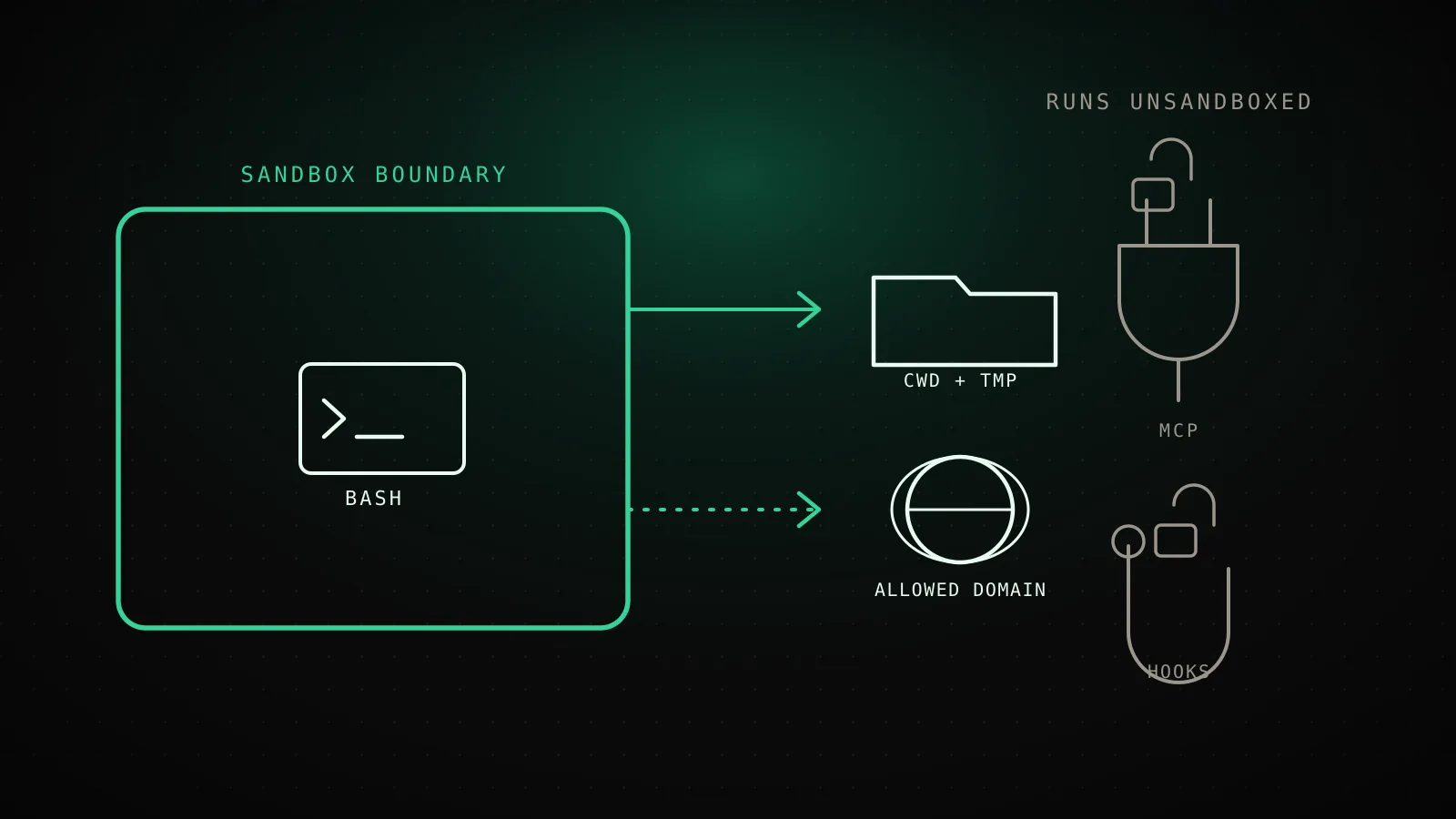
Sandbox mode runs Claude's Bash commands through an OS-level boundary - Seatbelt on macOS, bubblewrap on Linux and WSL2 - that blocks writes outside your working directory and blocks connections to any network domain you haven't allowed. Turn it on with /sandbox and most commands stop needing a permission prompt, because the operating system is doing the containing instead of you clicking approve. It only constrains the Bash tool, though: file edits, MCP servers, hooks, and computer use all still run directly on your machine, unconstrained.
TL;DR: Sandbox mode (
/sandbox) restricts Bash commands to your working directory plus a temp folder for writes, and to network domains you've explicitly allowed, enforced by Seatbelt on macOS and bubblewrap on Linux/WSL2. It doesn't sandbox Read, Edit, MCP servers, hooks, or computer use - those keep full host access - and its default read policy still permits reading credential files like~/.aws/credentialsunless you add asandbox.credentialsrule. Pair it with permission rules rather than swapping one for the other; for anything running fully unattended, the Bash sandbox alone isn't enough - use a container, VM, or the separate sandbox runtime so the rest of the process is covered too.
What Sandbox Mode Actually Restricts
By default, sandboxed commands can write only to the current working directory and the session's temp directory ($TMPDIR points there for the duration) - reads stay wide open across the rest of the disk, which matters more than it sounds like, covered below. Network access is enforced separately: Claude Code pre-allows zero domains, and the first time a command needs one, you get a prompt (or the classifier decides, in auto mode); approve it and that host stays allowed for the session, or permanently if you choose "don't ask again."
Both are configurable in settings.json. To let a subprocess like kubectl or terraform write somewhere outside the working directory:
{
  "sandbox": {
    "enabled": true,
    "filesystem": {
      "allowWrite": ["~/.kube", "/tmp/build"]
    }
  }
}
One protection you can't configure away: inside whatever the sandbox lets a command write to, a fixed list of paths stays denied regardless - .claude/settings*, .claude/hooks, .mcp.json, .git/hooks, .git/config, and your shell startup files. The logic is simple: a command that could edit those could grant itself permissions or plant a hook that runs unsandboxed next session. No allowWrite entry or Edit allow rule lifts it; the only way off is filesystem.disabled, which turns off the whole filesystem layer, not just this list.
| Layer | Default behavior |
|---|---|
| Filesystem write | Working directory + session temp dir only |
| Filesystem read | Entire disk, except the protected-paths list above |
| Network | Every domain denied until you approve it |
Five Things Sandbox Mode Doesn't Stop
What sandbox mode actually contains
code.claude.com/docs/en/sandboxing
Inside the boundary
OS-enforced: Seatbelt on macOS, bubblewrap on Linux/WSL2
Bash commands
Every shell command Claude runs
Their child processes
npm, git, build scripts, anything Bash spawns
Runs outside it, full host access
The sandbox has no effect on any of these
Read
Gated by permission rules, not the sandbox
Edit and Write
Same - permission rules only
MCP servers
Separate processes, run unconstrained
Hooks
Separate processes, run unconstrained
Computer use
Controls your actual screen directly
The scope above is the first gap: sandbox mode is a Bash-only boundary, so anything routed through MCP servers or hooks skips it entirely, same as Read, Edit, and Write. Four more are worth knowing before you treat it as a hard security control:
Your credentials, by default. The read policy above is real for ~/.aws/credentials and ~/.ssh too - sandboxing restricts what a command can write and reach over the network, not what it can read off disk. Deny those explicitly:
{
  "sandbox": {
    "enabled": true,
    "credentials": {
      "files": [
        { "path": "~/.aws/credentials", "mode": "deny" },
        { "path": "~/.ssh", "mode": "deny" }
      ],
      "envVars": [{ "name": "GITHUB_TOKEN", "mode": "deny" }]
    }
  }
}
Encrypted exfiltration over a domain you already allowed. The built-in proxy makes its allow decision from the hostname a request asks for, without inspecting the encrypted contents by default. Anthropic's own limitations section is direct about this: allow something broad like github.com and a sandboxed process can potentially reach an unintended host through that same allowed connection via domain-fronting-style tricks.
A command that just retries unsandboxed. When a command fails because the sandbox blocked it, Claude Code can retry it with the dangerouslyDisableSandbox parameter, which drops it back to the regular permission flow - a prompt in Manual mode, the classifier in auto mode. Set "allowUnsandboxedCommands": false if you'd rather a blocked command fail outright than fall back.
Computer use. When Claude drives your screen directly instead of running a shell command, that happens on your actual desktop with per-app permission prompts as the only gate. The Bash sandbox has no part in it.
Turning On and Configuring the Sandbox
Run /sandbox in a session. It opens a panel with a Mode tab (auto-allow runs sandboxed commands without prompting; regular permissions keeps prompting even when sandboxed), an Overrides tab for the unsandboxed-retry setting above, and a Config tab showing your resolved settings. On Linux, a Dependencies tab shows up first if anything required is missing.
Setup differs by platform. macOS needs nothing installed - sandboxing uses the built-in Seatbelt framework. Linux and WSL2 need two packages:
sudo apt-get install bubblewrap socat
bubblewrap enforces the filesystem isolation and socat relays sandboxed network traffic to the proxy. I ran the actual dependency check against a fresh Linux box building this guide instead of assuming the docs' description held:
Tested live for this guide: a stock Ubuntu 24.04 runner
not assumed from the docs
which bwrapwhich socatsysctl kernel.apparmor_restrict_unprivileged_usernsZero of the sandbox's two Linux dependencies were present, and the AppArmor restriction Ubuntu 24.04+ ships with was already on - the exact combination the docs warn stops bubblewrap from creating the namespaces the sandbox needs. On a box like this, /sandbox shows only its Dependencies tab until both are fixed.
That AppArmor restriction has a documented fix, straight from Anthropic's own troubleshooting section - check sysctl kernel.apparmor_restrict_unprivileged_userns first, and only apply this if it returns 1:
sudo tee /etc/apparmor.d/bwrap > /dev/null <<'EOF'
abi <abi/4.0>,
include <tunables/global>

profile bwrap /usr/bin/bwrap flags=(unconfined) {
  userns,
  include if exists <local/bwrap>
}
EOF
sudo systemctl reload apparmor
Once dependencies are sorted, selecting a mode in the /sandbox panel saves it to .claude/settings.local.json for that project. To enable sandboxing everywhere, set it in your user settings instead:
{
  "sandbox": { "enabled": true }
}
Building your settings.json by hand alongside a dozen other fields gets old fast - the settings.json generator builds the same shape from a checklist if you'd rather not type it.
Sandbox Mode and Permission Rules Aren't the Same Layer
Permission rules decide whether a tool call runs at all, and they cover every tool - Bash, Read, Edit, WebFetch, MCP, all of it - evaluated before anything executes. Sandboxing is the operating system restricting what an already-running Bash command can touch, and it only applies to Bash. Even in auto-allow mode, an explicit deny rule still blocks a sandboxed command, and a content-scoped ask rule like Bash(git push *) still forces a prompt.
That split is exactly why the Bash sandbox on its own isn't the isolation boundary for a fully unattended run. If you're using --dangerously-skip-permissions or auto mode with nothing watching, the sandbox alone leaves file tools, MCP servers, and hooks running on your host with no restriction. The next five approaches close that gap, each covering more of the process at the cost of more setup:
Six ways to isolate Claude Code, lightest to strongest
only #1 covers Bash alone
- 1
Sandboxed Bash tool
Bash commands and their child processes
Docker
No
Setup effort
Minimal on macOS, low on Linux/WSL2
- 2
Sandbox runtime
The whole process - file tools, MCP servers, hooks
Docker
No
Setup effort
Low
- 3
Dev container
Full development environment
Docker
Yes
Setup effort
Medium
- 4
Custom container
Full development environment
Docker
Yes
Setup effort
Medium to high
- 5
Virtual machine
Full operating system
Docker
No
Setup effort
High
- 6
Claude Code on the web
Full operating system, hosted by Anthropic
Docker
No
Setup effort
None (needs a Claude subscription)
The sandbox runtime (@anthropic-ai/sandbox-runtime) is the middle ground worth knowing about: same Seatbelt/bubblewrap primitives as the built-in sandbox, but wrapping the whole Claude Code process instead of just Bash, and without needing Docker. It's a beta research preview, configured through ~/.srt-settings.json and launched with npx @anthropic-ai/sandbox-runtime claude.
Fixing the Errors You'll Actually Hit
A handful of failures show up often enough that Anthropic documents them by name:
jesthangs or fails.watchmanis incompatible with the sandbox. Runjest --no-watchman.dockercommands fail outright. Docker doesn't work inside the sandbox at all. Add"docker *"toexcludedCommandsin your sandbox settings so it runs outside instead.gh,gcloud, orterraformfail TLS verification on macOS. Go-based CLIs can fail under Seatbelt. Same fix - list them inexcludedCommands.- A git command fails with
unable to unlink old.git mergeorcheckouttried to replace a file the sandbox denies writes to - often one of the protected paths from earlier. Approve the unsandboxed retry Claude offers, or run the git command yourself in another terminal. open,osascript, or a browser auth flow fails with error-600on macOS. The sandbox blocks Apple Events by default. SettingallowAppleEventsfixes it but removes code-execution isolation - sandboxed commands can then launch other apps unsandboxed - so prefer adding the specific command toexcludedCommandsinstead.
FAQ
What does Claude Code's sandbox mode actually protect?
It restricts what Bash commands and their child processes can touch: writes are confined to your working directory and the session's temp folder, and network requests are blocked to any domain you haven't approved, with the operating system - Seatbelt on macOS, bubblewrap on Linux and WSL2 - enforcing both boundaries directly on the running process.
What doesn't Claude Code's sandbox mode protect against?
Five things: it only covers the Bash tool, so Read, Edit, Write, MCP servers, hooks, and computer use all still run unconstrained on your host; the default read policy still lets sandboxed commands read credential files like ~/.aws/credentials and ~/.ssh unless you add a sandbox.credentials rule; the built-in network proxy doesn't inspect TLS by default, so an allowed domain can still carry data out over an encrypted connection; a command that fails inside the sandbox can retry with dangerouslyDisableSandbox and drop back to the regular permission flow unless you disable that; and computer use runs on your actual screen, outside the boundary entirely.
How do I turn on Claude Code's sandbox mode?
Run /sandbox in a session, choose auto-allow or regular permissions on the Mode tab, and Claude Code saves the choice to .claude/settings.local.json for that project. Set sandbox.enabled to true in ~/.claude/settings.json to turn it on for every project. macOS needs nothing extra since it uses the built-in Seatbelt framework; Linux and WSL2 need bubblewrap and socat installed first.
Does sandbox mode replace permission rules?
No. Permission rules decide whether a tool call runs at all and cover every tool Claude Code has. Sandboxing is OS-level enforcement that only applies once a Bash command is already running, and only to Bash. They're built to run together: rules stop the call, sandboxing limits what a call that does run can reach.
Why does docker fail inside the sandbox?
Docker is incompatible with the sandbox - it needs to reach the Docker daemon in ways the boundary blocks. Add "docker *" to excludedCommands in your sandbox settings so Claude runs Docker commands outside the sandbox instead of retrying them inside it.
Is Claude Code's sandbox mode available on Windows?
Not natively. The sandbox runs on macOS, Linux, and WSL2 only. On native Windows, run Claude Code inside a WSL2 distribution, or use a dev container or virtual machine instead.
The sandbox contains commands, not judgment
Sandbox mode is one of the rare Claude Code settings where turning it on costs almost nothing and buys real, OS-enforced containment - the two things worth doing are checking your Linux dependencies before you rely on it, and pairing it with permission rules instead of treating either as a substitute for the other. Getting that combination right by hand, alongside the rest of a tuned config, is exactly the setup ClockedCode ships in one paste.