Claude Code Skills: What They Are and How to Use Them
 By Neo Zino - builder of ClockedCode11 min read
What a Claude Code skill is, how it differs from a subagent, MCP server, and plugin, how to write your own SKILL.md, and which skills ClockedCode ships.
Made with DispatchSEO
On this page
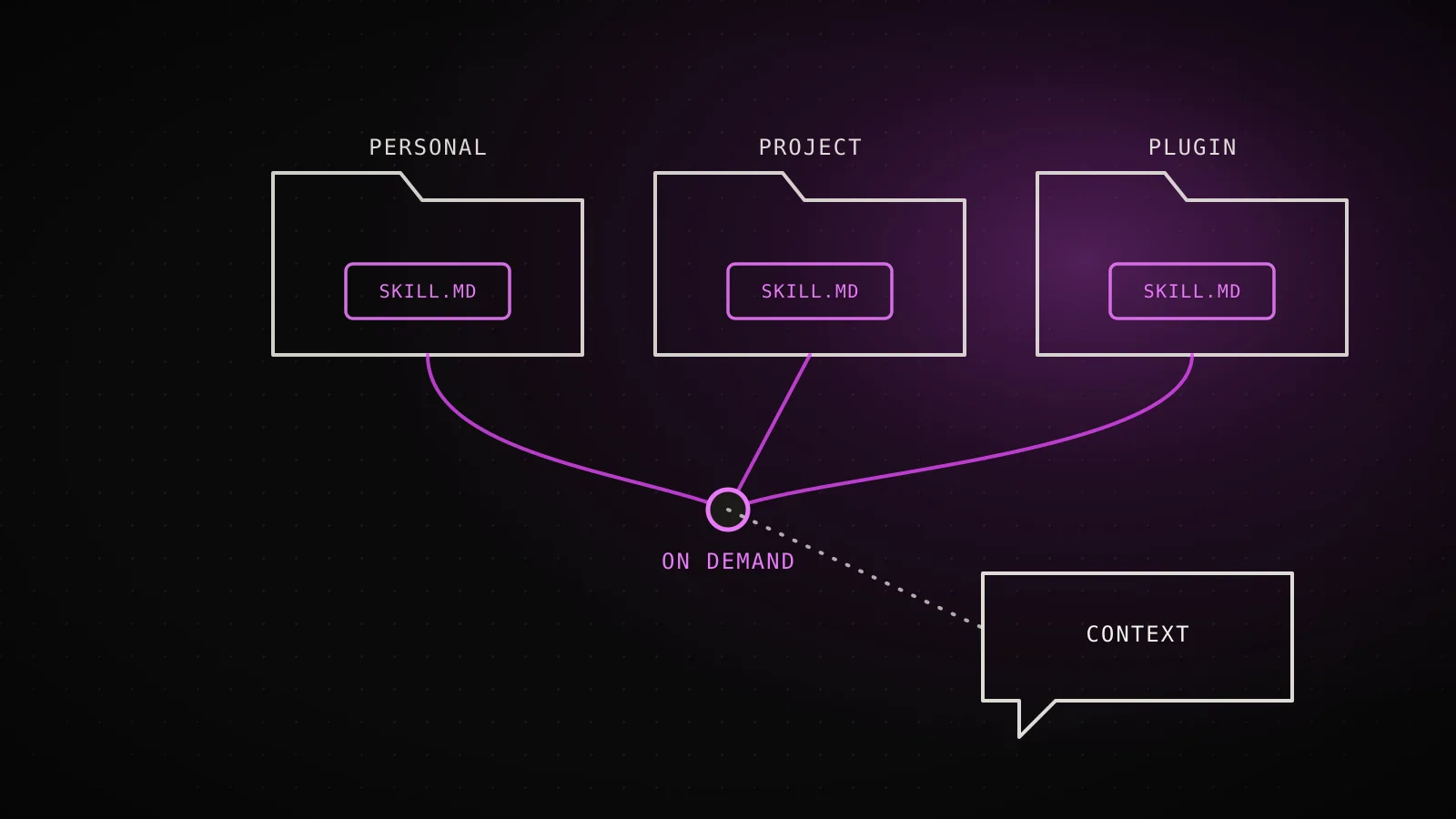
A Claude Code skill is a folder containing a SKILL.md file of instructions that Claude loads into the conversation only when it's relevant, instead of sitting in every single prompt the way a CLAUDE.md fact does. Claude applies a skill automatically when your request matches its description, or you invoke it directly by typing /skill-name. The mechanism is deliberately cheap: a skill can hold hundreds of lines of workflow guidance and cost close to nothing until the moment it fires.
TL;DR: A skill is a
SKILL.mdfolder Claude loads on demand, not a standing instruction likeCLAUDE.md. Onlydescriptionis recommended in its YAML frontmatter - everything else, includingname, is optional, and this repo's own build pipeline proves it: one installed skill declares seven frontmatter fields, another ships with two lines and invokes exactly the same way. Setdisable-model-invocation: trueto make a skill manual-only, orcontext: forkto run it as a subagent instead of inline. ClockedCode's curated setup installs five: Frontend-design, UI/UX Pro Max, Superpowers, Humanizer, and security-guidance.
What counts as a skill, and what doesn't
Custom commands were folded into skills, which is the detail most explainers skip: a file at .claude/commands/deploy.md and a skill at .claude/skills/deploy/SKILL.md both create /deploy and behave the same way, so anything you already built as a slash command is already a skill in every sense that matters. What a skill adds on top is a directory for supporting files, frontmatter that controls who can invoke it, and the ability for Claude to load it automatically when your request matches.
Claude Code also ships bundled skills you never installed - /code-review, /debug, /loop, /batch, and a few others - available in every session unless you set disableBundledSkills. Two of those, /run and /verify, are worth knowing before you write your own: they infer how to launch and check your app from your README or package.json, and when that inference isn't enough, /run-skill-generator records the working recipe as a real project skill at .claude/skills/run-<name>/ so later sessions stop rediscovering it from scratch.
A skill's content sits in two buckets, and which one you're writing changes how you should invoke it. Reference content - conventions, patterns, domain facts - runs inline alongside your conversation, which is exactly what you'd otherwise be pasting into CLAUDE.md every session. Task content - a specific procedure like a deploy or a commit - is usually better invoked directly with /name than left for Claude to decide on its own, which is what the invocation controls further down are for.
Skills next to subagents, MCP servers, and plugins
"Skill" gets used loosely enough in search results that it's worth pinning down against the three things it's most often confused with:
| What it actually is | Where it runs | |
|---|---|---|
| Skill | Prose instructions Claude follows, loaded on demand | Your current context window |
| Subagent | A worker Claude spawns for one task | Its own separate context window |
| MCP server | An external connection adding tool schemas | Outside the model entirely |
| Plugin | A distribution bundle for the other three | Wherever it's installed from |
A plugin isn't a fifth category competing with the other three - it's just how you get one, several, or all of them onto your machine in one claude plugin install. And the skill/subagent line blurs on purpose: add context: fork to a skill's frontmatter and Claude Code runs it as a forked subagent instead of inline, using the skill's body as that subagent's task. Which one you actually want comes down to one question - does this need its own clean context, or can it run in the conversation you're already having? A skill that just restates conventions belongs inline; a skill that goes off and reads a dozen files before answering is a context: fork candidate.
Where a skill lives decides who can use it
Same file name, four possible skills - here's which one wins
top wins tiesEnterprise
Every user in the organizationmanaged settings directoryWins over personal and project
Personal
All of your own projects~/.claude/skills/<name>/SKILL.mdWins over project
Project
This repo only.claude/skills/<name>/SKILL.mdLoses to enterprise and personal
Plugin
Wherever the plugin is enabled<plugin>/skills/<name>/SKILL.mdNamespaced plugin:skill - can't collide
From code.claude.com's skills doc - a nested .claude/skills/ below your working directory adds a fifth, directory-qualified variant instead of overriding any of these four.
Name collisions resolve by source, not by which one you wrote most recently: a personal skill beats a project skill with the same name, and a skill at any of these levels overrides a bundled skill sharing its name (though never the bundled skill's aliases - a project code-review skill replaces /code-review, but /review still runs the built-in). Project skills load from every .claude/skills/ between your starting directory and the repo root, and Claude Code watches those directories for edits during the session - add, edit, or remove a SKILL.md and the change is live without a restart. A brand-new top-level skills folder is the one exception; that needs a restart to be picked up.
Writing your first SKILL.md
A skill needs one file: YAML frontmatter between --- markers, then markdown instructions below it. Here's a small one that turns your current diff and recent commits into PR-description bullet points:
---
name: pr-notes
description: Draft PR description bullets from the current diff and recent commits. Use when opening a pull request or asked to summarize what changed.
---

## Diff
!`git diff main...HEAD`

## Recent commits
!`git log main..HEAD --oneline`

## Your task
From the diff and commits above, write 3-5 bullet points for a PR
description: what changed, why (infer from commit messages), and
anything a reviewer should look at closely.
Save that to .claude/skills/pr-notes/SKILL.md, and Claude either loads it automatically when you ask "write a PR description" or you invoke it directly with /pr-notes. The two !`command` lines are dynamic context injection: Claude Code runs each shell command before the skill content reaches Claude, and the output replaces the placeholder, so the instructions arrive with your actual diff already inlined instead of asking Claude to go read it separately. That inline form only fires at the start of a line or right after whitespace - a command embedded mid-word is left as literal text.
Two skills this build actually runs, frontmatter unedited
read off disk.claude/skills/humanizer/SKILL.md
---
name: humanizer
version: 2.8.2
description: |
  Remove signs of AI-generated writing from text...
license: MIT
compatibility: any-agent
allowed-tools:
  - Read
  - Write
  - Edit
  - Grep
  - Glob
---
Every optional field used at once - a skill meant to be shared outside this repo.
.claude/skills/seo-manager/SKILL.md
---
name: seo-manager
description: The SEO manager entry point for
  clockedcode.com. Use for any SEO workflow...
---
Two lines, nothing else - and it invokes the same as the fuller one.
Both files run this site's own DispatchSEO pipeline - read directly off this repo, not reconstructed from the docs.
Every frontmatter field beyond description is optional, and this repo's own DispatchSEO pipeline is the proof rather than just a claim from the docs: the humanizer skill declares a version, a license, a compatibility string, and an explicit tool allowlist, while seo-manager ships two lines and loads exactly the same way. Start minimal and add fields only once you need what they do - allowed-tools to pre-approve commands for the turn that invokes the skill, arguments to name positional inputs, model or effort to override what the rest of the session is using while the skill is active.
Deciding who's allowed to trigger it
One frontmatter line decides who can trigger it
(default)Description always loaded; full skill loads when invoked
disable-model-invocation: trueDescription not loaded; full skill loads only when you invoke it
user-invocable: falseDescription always loaded; full skill loads when invoked
From code.claude.com's skills doc, "Control who invokes a skill".
disable-model-invocation: true is the one worth setting deliberately, because the default lets Claude decide when to run a skill on its own - fine for reference content, risky for anything with a side effect. A deploy skill, a commit skill, a "message the team on Slack" skill: you don't want Claude reaching for those because your code merely looks ready. user-invocable: false is the inverse, for background knowledge that isn't a meaningful command a person would type - a skill explaining how a legacy subsystem works belongs in Claude's context when relevant, but /legacy-system-context isn't an action anyone takes on purpose.
The five skills ClockedCode ships
ClockedCode's curated setup installs five skills as part of its 20-tool roster, and their frontmatter choices are a real-world tour of the controls above rather than a hypothetical. Frontend-design and security-guidance stay on the default - Claude reaches for them automatically whenever it builds UI or writes code, which is the entire point of an "AUTO" tool in this setup. Superpowers, by contrast, gets disable-model-invocation: true added to its gateway skill's frontmatter as an explicit post-install step, specifically so its brainstorm-plan-verify discipline only kicks in when you type /superpowers yourself rather than on every request. UI/UX Pro Max and Humanizer round out the five - a design-reference library and the writing-cleanup skill this exact guide was run through before it shipped.
That mix is the practical answer to "which skills should I install": a small number, personally verified against real work, with the invocation setting matched to whether you want Claude reaching for it unprompted. ClockedCode's Claude Code templates bundle the marketplace-add and install commands for all five (and the rest of the curated setup) into copy-paste configs, so you're not typing claude plugin install five separate times. If you want the fuller case for which skills earn a permanent place and which don't, the best Claude Code skills guide covers that ground directly.
When a skill is the wrong tool
- It needs its own clean context. A skill's content lands in your current conversation and stays there for the rest of the session. If the task would flood that context with intermediate reading you don't need summarized in full, that's a subagent (or a skill with
context: fork), not a plain skill. - It needs to call an external system. A skill is prose Claude follows, not a tool schema - it can't add new capabilities the model doesn't already have. Talking to a database, a ticketing system, or any live API is an MCP server's job.
- It's a fact true on every single turn. On-demand loading is the whole advantage of a skill over
CLAUDE.md; a fact Claude needs in every request gets that benefit only in reverse; you're now waiting for a match instead of Claude just already knowing it. Keep universal, always-relevant facts inCLAUDE.mdand save skills for the procedures you don't need constantly. - You've stopped auditing the list. Every installed skill's description competes for a fixed context budget - Claude Code trims descriptions starting with your least-used skills once the listing overflows. An unaudited pile of skills doesn't just clutter
/skills; it can quietly starve the ones you rely on most of the description text they need to match your request.
FAQ
What is a Claude Code skill?
A folder with a SKILL.md file of instructions that Claude Code loads into the conversation only when it's relevant, instead of carrying that content in every prompt the way CLAUDE.md does. Claude applies a skill automatically when your request matches its description, or you invoke it directly by typing /skill-name.
How do I create a skill in Claude Code?
Make a folder under ~/.claude/skills/ (personal, all your projects) or .claude/skills/ (project-only) named after the skill, and save a SKILL.md inside it with YAML frontmatter between --- markers plus markdown instructions below. Only description is recommended in the frontmatter - every field, including name, is technically optional.
What's the difference between a skill and a subagent?
A skill is prose instructions that load into your current context window; a subagent is a separate worker with its own context window that reports a summary back. Add context: fork to a skill's frontmatter and it runs as a subagent instead, so the two aren't mutually exclusive - a skill can launch one.
How do I stop Claude from running a skill on its own?
Add disable-model-invocation: true to the skill's YAML frontmatter. Claude can then only run it when you type /skill-name yourself, which is the right setting for anything with side effects, like a deploy or a commit skill.
Does ClockedCode's curated setup include any skills?
Yes, five: Frontend-design, UI/UX Pro Max, Superpowers, Humanizer, and security-guidance, each installed as a plugin skill and tuned with the same invocation-control frontmatter this guide covers - Superpowers ships with disable-model-invocation: true set so it never fires without being asked.
Write one small before you install a bundle
The fastest way to trust a skill is writing one small enough to verify by eye - the PR-notes example above, or something narrower still, before reaching for a marketplace bundle. Once you've confirmed the frontmatter does what you expect on something tiny, installing a bigger one like Superpowers or Frontend-design is a config decision instead of a leap of faith. It's also exactly the kind of tuning ClockedCode does by default, invocation settings included, alongside the rest of a curated Claude Code setup.