Claude Code Settings: Every settings.json Option Worth Changing
 By Neo Zino - builder of ClockedCode10 min read
Where Claude Code reads settings.json, which file wins, which of 244 keys work in your own files, and a tested starter config you can paste in.
Made with DispatchSEO
On this page
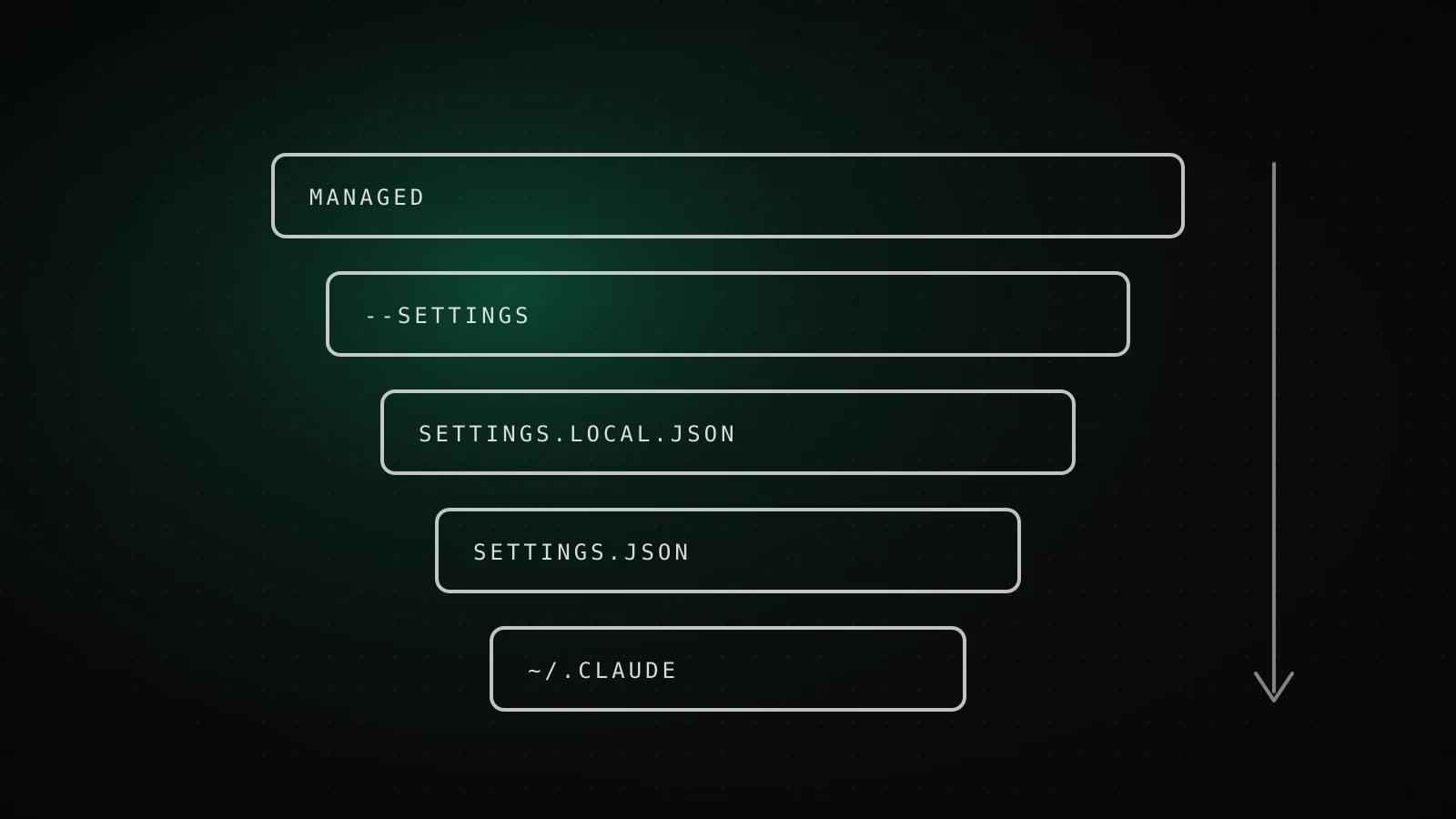
Claude Code settings live in JSON files at five levels: managed, command line, .claude/settings.local.json, .claude/settings.json, and ~/.claude/settings.json. Higher levels beat lower ones when the same key appears twice, except list keys such as permissions.allow, which merge. Most people only ever need two of them: your user file for personal defaults and the committed project file for what the team shares.
TL;DR: Put personal defaults in
~/.claude/settings.json, team rules in.claude/settings.json, and your own per-repo overrides in.claude/settings.local.json. The settings reference documents 244 keys, but only 156 work in any file, so check the key's scope before blaming a typo. Edits apply live without a restart, and/statusplusclaude doctortell you what loaded and what was rejected. A tested starter config is below.
Which settings file wins when two disagree?
Order matters because the same key can appear in several files. This is the order as of Claude Code 2.1.301, taken from the official settings page:
Settings precedence, highest first
When the same key appears twice, the higher row wins. List keys such as permissions.allow merge instead.
- Nothing below overrides it
1. Managed - Your organization
managed-settings.json, MDM or the claude.ai console - Gone when the session ends
2. Command line - You, this session
claude --settings - Kept out of git
3. Project local - You, this project
.claude/settings.local.json - Committed
4. Shared project - Everyone on the repo
.claude/settings.json - Lowest priority
5. User - You, every project
~/.claude/settings.json
Two details trip people up. The committed project file sits below your local one, so a teammate's .claude/settings.json never overrides what you put in .claude/settings.local.json. And lists combine: if your user file allows Bash(git diff *) and the project file allows Bash(npm run *), you get both. The exceptions are model lists such as fallbackModel and availableModels, where one file's whole value wins because position or exclusivity carries meaning.
Claude Code creates files for you in two cases. It writes ~/.claude/settings.json the first time you change a /config option stored there, and .claude/settings.local.json the first time you answer "Yes, and don't ask again" to a Bash prompt. That second one is why the local file often has rules in it you never typed. If you work from a subdirectory of a git repo, it reads and writes that file at the repository root. For the permission side of this, see the permissions guide.
A fifth file, ~/.claude.json, is not a settings file. Claude Code writes it for itself: your sign-in session, MCP server definitions and per-project trust decisions. Leave it alone unless a setting is explicitly documented as "Global config".
How many settings can you actually put in any file?
I counted. Every key entry on the settings reference page has a Scope line, and I tallied them against Claude Code 2.1.301:
244 documented settings, split by where they work
Counted from the Scope line of each key in the official settings reference.
- Any settings file156 of 244
User, project or local
- Managed only44 of 244
Ignored in your own files
- User or managed27 of 244
Ignored in a committed project file
- Global config12 of 244
Lives in ~/.claude.json
- User, local or managed4 of 244
Never from the shared project file
- User only1 of 244
Only ~/.claude/settings.json
That is the real reason "I set it and nothing happened" is such a common complaint. Roughly 64% of documented keys (156 of 244) work in any file. The other 88 are managed-only, restricted to user or managed files, or live in ~/.claude.json. A managed-only key like allowManagedHooksOnly is silently ignored in your own settings.json, and a key marked "User or managed" never takes effect from the committed project file. auto and bypassPermissions as a defaultMode are another case: they do not apply from project or local settings, so put them in the user file or not at all.
Which settings are worth changing first?
Skip the long tail. These are the ones I would look at on a fresh install, all valid in any file unless noted:
| Key | What it does | Why change it |
|---|---|---|
model | Default model for every new session | Stop picking one with /model each time. --model and ANTHROPIC_MODEL still override it per session |
permissions.defaultMode | Mode new sessions start in | acceptEdits removes edit prompts without touching Bash prompts |
permissions.allow / ask / deny | Rule lists, evaluated deny, then ask, then allow | The whole point of a tuned config; see the permissions guide |
env | Environment variables for every session and subprocess | Overwrites the same variable from your shell; handy for DISABLE_AUTO_COMPACT or a proxy URL |
cleanupPeriodDays | Days to keep transcripts (default 30, minimum 1) | Shorter retention if sessions may contain secrets |
autoUpdatesChannel | "latest" (default) or "stable" | stable follows a build about a week old that skips releases with major regressions |
attribution.commit / attribution.pr | Text Claude Code appends to commits and PRs | An empty string hides the default Co-Authored-By trailer |
includeGitInstructions | Built-in commit and PR instructions plus a git status snapshot | Set false if your own skills own the git workflow |
effortLevel | Default effort: low, medium, high, xhigh | Cheaper and faster on routine work |
statusLine | Command that renders a line under the prompt | See the statusline examples |
hooks | Commands that run at lifecycle points | Auto-format, block risky commands; see the hooks guide |
disableAllHooks is worth knowing as a switch. It turns off hooks, a custom status line and a custom file suggestion command in one go, which is a quick way to test whether a hook is causing a problem without deleting anything.
What does a starter settings.json look like?
I wrote this one for the guide and ran it through jq and claude doctor on 2.1.301. The $schema line gives your editor autocompletion and validation from the published JSON schema; I checked that the schema defines all six top-level keys used below.
{
  "$schema": "https://json.schemastore.org/claude-code-settings.json",
  "model": "claude-sonnet-5",
  "env": {
    "DISABLE_AUTO_COMPACT": "1"
  },
  "permissions": {
    "defaultMode": "acceptEdits",
    "allow": ["Bash(npm run *)", "Bash(git diff *)"],
    "deny": ["Read(.env)", "Bash(rm -rf *)"]
  },
  "cleanupPeriodDays": 14,
  "autoUpdatesChannel": "stable",
  "attribution": { "commit": "", "pr": "" }
}
With that saved as .claude/settings.json, claude doctor reported no settings errors. To see what an error looks like, I added a .claude/settings.local.json with "cleanupPeriodDays": "fourteen" and ran it again:
Invalid settings
- /tmp/cfgtest/.claude/settings.local.json › cleanupPeriodDays: Expected number, but received string
It names the exact file and key, so a broken override is easy to find. In an interactive session the same problem shows a Settings Error dialog at startup that offers to fix the file with Claude's help. In a -p run there is no dialog; Claude Code skips the bad values and carries on, so run claude doctor afterwards if a headless run ignored something.
Rather than hand-typing rules, the settings.json generator builds the same shape from a checklist.
Where do managed settings live?
Managed settings are the organization-owned layer. Nothing in your own files or --settings overrides a managed key, apart from a few security keys where a stricter lower value still counts. They arrive three ways: a managed-settings.json file in a system directory, MDM or OS policy, or server-managed settings from the claude.ai admin console.
Managed settings file locations
Put managed-settings.json in the folder for your OS. Optional managed-settings.d/*.json files in the same folder merge on top in alphabetical order.
macOS
/Library/Application Support/ClaudeCode/Linux and WSL
/etc/claude-code/Windows
C:\Program Files\ClaudeCode\
The docs say Claude Code no longer reads the legacy Windows path under C:\ProgramData, so an old rollout script pointing there is a silent failure. If several teams own parts of a policy, give each its own file in managed-settings.d/ with numeric prefixes such as 10-telemetry.json and 20-security.json; they merge in alphabetical order after the base file. Hidden files and anything not ending in .json are ignored. A managed file that is present but is not valid JSON makes Claude Code refuse to start and name the source, which is deliberate: a broken policy should not quietly turn into no policy.
As a user, you do not edit any of this. You check it: run /status and read the Setting sources line to see whether a managed source applies to you.
Do edits apply without a restart?
Mostly yes. Claude Code watches user, project, local and managed settings files and applies most edits to the running session, including permissions, hooks and credential helpers like apiKeyHelper. It also picks up a settings file you create mid-session. A few keys are read only at session start, and managed settings that arrive from MDM or the console follow their own refresh schedule, so restart first when a managed change does not show up.
Why is Claude Code ignoring my setting?
Work down this list in order. It is the same one I use:
- Run
/status. TheSetting sourcesline lists every file that loaded. A missing file means a path or filename typo (it issettings.local.json, notsettings.local.js). - Run
claude doctor. It lists entries that were rejected, like the string-for-number error above. - Check the key's scope. If the reference says "User or managed" or "Managed", it does nothing in a project file.
- Look one level up. A higher file may set the same key.
/statusshows which files loaded, but not which one supplied each key, so open them and compare. For a model set by project or managed settings, the startup header names the file. - Look for a session override.
--model,--permission-modeandANTHROPIC_MODELbeat the saved key for that one session.
A related trap: a rule you added is not removed by a lower file. Because permissions.allow merges, your organization's allow rules still apply next to yours unless it sets allowManagedPermissionRulesOnly.
When settings.json is the wrong place
Settings control behavior. They are not where instructions go. Style rules, architecture notes and "always run the tests" belong in a CLAUDE.md or a rules file, and persistent context is covered in the memory guide. MCP servers have their own config; see the MCP config guide. And a deny rule only stops Claude's own tools, not a script it spawns, so real isolation is a job for sandbox mode. Also resist copying someone's 60-line settings file wholesale. Every key you set is one you now have to remember when behavior surprises you.
FAQ
Where is the Claude Code settings file?
Your personal one is ~/.claude/settings.json. A project has two: .claude/settings.json (committed, shared with the team) and .claude/settings.local.json (yours only, kept out of git). Organizations can also deploy a managed-settings.json, which sits above all of them.
Which Claude Code settings file takes priority?
Managed settings first, then command line flags, then .claude/settings.local.json, then .claude/settings.json, then ~/.claude/settings.json. The one exception is list keys like permissions.allow, which merge across files instead of overriding.
Do I need to restart Claude Code after editing settings.json?
Usually no. Claude Code watches the settings files and applies most edits to the running session, including permissions and hooks. A few keys are read only once at session start, so if an edit does nothing, restart the session and run /status.
Why is Claude Code ignoring a setting I added?
Most often the key is not allowed in that file (managed-only keys are ignored in your own files, and some keys never apply from the shared project file), a higher file overrides it, or the JSON is invalid. Run /status to see which files loaded and claude doctor to see what was rejected.
Should I commit .claude/settings.json?
Yes, for team-wide permissions, hooks and plugins. Keep personal preferences and anything with a machine-specific path in .claude/settings.local.json, which Claude Code adds to your global git excludes the first time it writes the file.
One file for you, one for the team
Get the split right and settings stop being mysterious: personal defaults in the user file, shared rules committed, experiments in the local file, and /status when anything surprises you. If you would rather start from a tuned file than build one key at a time, that is what ClockedCode installs, settings.json included, in one paste.